Showing posts with label Mobile. Show all posts

Friday, January 15, 2016

Samsung to launch Galaxy Note5 dual SIM variant in India tomorrow

Samsung to launch Galaxy Note5 dual SIM variant in India tomorrow

Samsung will launch the dual SIM variant of its Galaxy Note5 flagship smartphone in India tomorrow. The 32GB model will carry a price tag of INR 51,400 (around $760), while the 64GB model will set you back INR 57,400 (around $845).
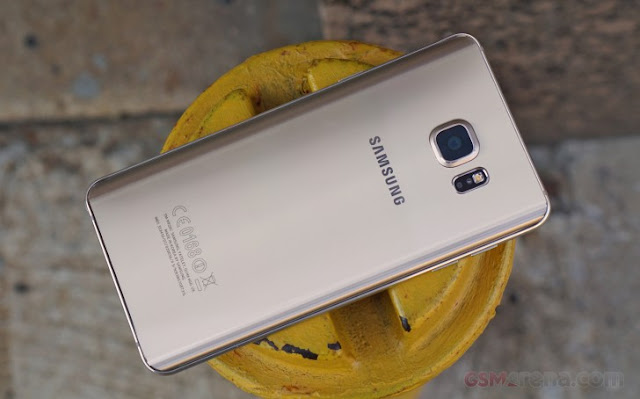
"In the high-end segment, we saw a very strong trend of people using dual-SIMs in our A series smartphones," said Manu Sharma, director-product marketing at Samsung India. "Consumers want a premium device, which has a local SIM and space for another SIM."

The South Korean company expects to extend its dual-SIM strategy to more flagship devices, including the Galaxy S6 edge and Galaxy S6 edge+ in the future. "We will continue doing products that will address an opportunity and we will drive the dual-SIM market in the premium segment, starting with the Note 5," Sharma said.

Specification

NETWORK Technology GSM / HSPA / LTE
2G bands GSM 850 / 900 / 1800 / 1900
3G bands HSDPA 850 / 1900 / 2100 - N920T, N920A, N920I

HSDPA 850 / 900 / 1900 / 2100 - N920G
4G bands LTE band 1(2100), 2(1900), 3(1800), 4(1700/2100), 5(850), 7(2600), 8(900), 17(700), 20(800) - N920A

LTE band 1(2100), 2(1900), 3(1800), 4(1700/2100), 5(850), 7(2600), 8(900), 12(700), 17(700), 19(800), 26(850), 28(700) - N920I

LTE band 1(2100), 2(1900), 3(1800), 4(1700/2100), 5(850), 7(2600), 8(900), 12(700), 17(700), 18(800), 19(800), 26(850), 28(700), 40(2300) - N920G
Speed HSPA 42.2/5.76 Mbps, LTE Cat6 300/50 Mbps/ LTE Cat9 450/50 Mbps
GPRS Yes
EDGE Yes
LAUNCH Announced 2015, August
Status Available. Released 2015, August
BODY Dimensions 153.2 x 76.1 x 7.6 mm (6.03 x 3.00 x 0.30 in)
Weight 171 g (6.03 oz)
SIM Nano-SIM

- S Pen stylus
- Samsung Pay (Visa, MasterCard certified)
DISPLAY Type Super AMOLED capacitive touchscreen, 16M colors
Size 5.7 inches (~75.9% screen-to-body ratio)
Resolution 1440 x 2560 pixels (~518 ppi pixel density)
Multitouch Yes
Protection Corning Gorilla Glass 4


PLATFORM OS Android OS, v5.1.1 (Lollipop)
Chipset Exynos 7420
CPU Quad-core 1.5 GHz Cortex-A53 & Quad-core 2.1 GHz Cortex-A57
GPU Mali-T760MP8
MEMORY Card slot No
Internal 32/64/128 GB, 4 GB RAM
CAMERA Primary 16 MP, f/1.9, 28mm, OIS, autofocus, LED flash, check quality
Features 1/2.6" sensor size, 1.12 µm pixel size, geo-tagging, touch focus, face/smile detection, panorama, HDR
Video 2160p@30fps, 1080p@60fps, dual-video rec., check quality
Secondary 5 MP, f/1.9, 22mm, 1440p@30fps, dual video call, Auto HDR
SOUND Alert types Vibration; MP3, WAV ringtones
Loudspeaker Yes
3.5mm jack Yes


COMMS WLAN Wi-Fi 802.11 a/b/g/n/ac, dual-band, Wi-Fi Direct, hotspot
Bluetooth v4.2, A2DP, EDR, LE
GPS Yes, with A-GPS, GLONASS, BDS
NFC Yes
Radio No
USB microUSB v2.0, USB Host
FEATURES Sensors Fingerprint, accelerometer, gyro, proximity, compass, barometer, heart rate, SpO2
Messaging SMS(threaded view), MMS, Email, Push Mail, IM
Browser HTML5
Java No

- Wireless charging (Qi/PMA) - market dependent
- ANT+ support
- S-Voice natural language commands and dictation
- Active noise cancellation with dedicated mic
- MP4/DivX/XviD/WMV/H.264 player
- MP3/WAV/WMA/eAAC+/FLAC player
- Photo/video editor
- Document editor


BATTERY
Non-removable Li-Po 3000 mAh battery
Stand-by
Talk time Up to 22 h (3G)
Music play Up to 64 h
MISC Colors Black Sapphire, Gold Platinum, Silver Titan, White Pearl
SAR US 1.53 W/kg (head)     1.28 W/kg (body)    
SAR EU 0.45 W/kg (head)     0.58 W/kg (body)    
Price group 42652
TESTS Performance Basemark OS II: 1852 / Basemark X: 26281
Display Contrast ratio: Infinite (nominal), 4.090 (sunlight)
Camera Photo / Video
Loudspeaker Voice 65dB / Noise 64dB / Ring 73dB
Audio quality Noise -93.6dB / Crosstalk -94.7dB
Battery life Endurance rating 85h

Monday, January 11, 2016

How to free up space in iCloud

How to free up space in iCloud

How to free up space in iCloud


Running out of cloud storage and don't want to buy more? Here are a few different ways to free up space in iCloud.


Apple's iCloud storage service can be used to stash away photos, videos, device backups, and more in the cloud. The company offers users 5GB of space for free, however because it's 5GB of space per Apple ID and not per device, you may find yourself running out of space faster than you would like. While additional storage can be purchased from Apple, there are ways to free up space in your iCloud account before shelling out some extra cash.

Check your space

To see how much space you are using, enter Settings on your iPhone or iPad, select iCloud, click Storage, followed by Manage Storage.

Delete old backups

There is a good chance that your backups are taking up most of your space. If you have backups from your old device, say from an iPhone 4 or iPad 2 that you no longer own, you can just go ahead and delete those. Simply click on the backup scroll to the bottom and tap Delete Backup.

Change backup settings


You may also be backing up items that you don't really need to have saved in the cloud. For me, that includes Safari data (I use Google Chrome instead) and Contacts (I save my contacts to Gmail), but it's different for everyone. Head to Setting and click on iCloud. From here you can pick and choose which items you would like to be saved to iCloud. If you find something you really don't care about, flip the switch to off to delete the data. This will also make sure it isn't backed up the next time you perform a backup.

Alternative photo services

An easy way to free up a lot of space in iCloud is to delete photos from your backups. Instead of having photos stored in iCloud, I recommend using one of the many third-party cloud services that offer even more free space than Apple. My personal favorite is Google Photos, which offers unlimited storage for free. There's also Yahoo's Flickr app, Microsoft One Drive, DropBox, and Amazon Cloud Drive. You can learn more about these services in this article.

This article was originally published in October 2014 and has been updated to include new information.

Friday, January 8, 2016

How to hide app icons on iOS 9.2

How to hide app icons on iOS 9.2

How to hide app icons on iOS 9.2


Apple has said it's looking at ways to give users the option of removing preinstalled apps from iOS devices. Although, the company has given no timetable or clear indication if such capabilities will ever manifest in a future version of iOS.

In the meantime, there are ways to get around the limitation. Instead of creating a folder for all of the Apple apps you have zero intention of using, you can take advantage of a bug discovered by Twitter user @VBarraquito.

You can make an app icon disappear by creating a folder, then dragging the icon to the right, creating a blank page within the folder. However, instead of lifting your finger and placing the icon on the new page, press the home button.

If everything has worked properly, you should see the app icon float off of the screen in the top-left corner. The app is still installed, and can be accessed by searching for it in Spotlight.


I tested the workaround on iOS 9.2.1 public beta 2 and was able to hide icons.

As has been the case in the past, the solution is a temporary one -- the app will reappear after you restart your iOS device. In order to hide the apps again, you'll need to go through the process once more. It's not perfect, but for those who don't often restart their device, it's better than nothing.

Below is a video of the trick in action:

Sunday, December 27, 2015

Speedup your Samsung Mobile

Speedup your Samsung Mobile

Speedup your Samsung Mobile


Speedup your Samsung Android Phone in simple way

Just follow this step

Step1:- Type *#9900# on your Samsung Mobile


Step 2: you can see Debug Level Enabled /Low now you select this and it will show 
HIGH- MID- LOW then select MID.

do not select high. !!

Now your mobile restart. then your mobile is speed than before. 


Share with your friends have a joy..!!

Saturday, December 12, 2015

 Samsung Galaxy S7

Samsung Galaxy S7

Unofficial preliminary specifications


Network Technology GSM / HSPA / LTE
2G bands GSM 850 / 900 / 1800 / 1900
3G bands HSDPA 850 / 900 / 1900 / 2100
HSDPA 850 / 900 / 1700 / 1900 / 2100
4G bands LTE
Speed HSPA 42.2/5.76 Mbps, LTE Cat9 450/50 Mbps
GPRS Yes
EDGE Yes
Launch Announced Exp. announcement 2016, February
Status Rumored. Exp. release 2016, Q1
Body Dimensions 143.4 x 70.8 x 6.9 mm (5.65 x 2.79 x 0.27 in)
Weight -
Build Corning Gorilla Glass 5 back panel
SIM Nano-SIM
- Samsung Pay (Visa, MasterCard certified)
Display Type Super AMOLED capacitive touchscreen, 16M colors
Size 5.1 inches (~70.6% screen-to-body ratio)
Resolution 1440 x 2560 pixels (~576 ppi pixel density)
Multitouch Yes
Protection Corning Gorilla Glass 5
- Force Touch display
- TouchWiz UI
Platform OS Android OS, v6.0 (Marshmallow)
Chipset Qualcomm MSM8996 Snapdragon 820/ Exynos 8 Octa 8890
CPU Octa-core
GPU Adreno 530/ Mali-T880 MP12
Memory Card slot No
Internal 32/64/128 GB, 4 GB RAM
Camera Primary Yes, phase detection autofocus, optical image stabilization, dual-LED (dual tone) flash
Features Geo-tagging, touch focus, face detection, Auto HDR, panorama
Video 2160p@30fps, 1080p@60fps, 720p@120fps, HDR, dual-video rec.
Secondary Yes, dual video call, Auto HDR
Sound Alert types Vibration; MP3, WAV ringtones
Loudspeaker Yes
3.5mm jack Yes
Comms WLAN Wi-Fi 802.11 a/b/g/n/ac, dual-band, Wi-Fi Direct, hotspot
Bluetooth v4.2, A2DP, LE, apt-X
GPS Yes, with A-GPS, GLONASS, BDS
NFC Yes
Infrared port Yes
Radio To be confirmed
USB microUSB v2.0, USB Host
Features Sensors Fingerprint, accelerometer, gyro, proximity, compass, barometer, heart rate, SpO2
Messaging SMS(threaded view), MMS, Email, Push Mail, IM
Browser HTML5
Java No
- Fast battery charging: 83% in 30 min (Quick Charge 3.0)
- Wireless charging (Qi/PMA) - market dependent
- ANT+ support
- S-Voice natural language commands and dictation
- OneDrive (115 GB cloud storage)
- Active noise cancellation with dedicated mic
- MP4/DivX/XviD/WMV/H.264 player
- MP3/WAV/WMA/eAAC+/FLAC player
- Photo/video editor
- Document editor
Battery Non-removable battery
Misc Colors Various

 Buy 1 smartphone, get 1 free..!! only not all that simple

Buy 1 smartphone, get 1 free..!! only not all that simple

AT&T is offering a holiday deal, where you can get two smartphones for the price of one. That does sound too good to be true, and it's mostly because it is, though there likely are those that can take advantage.

The offer extends to popular models like the Samsung Galaxy S6, as well as the carrier exclusive Galaxy S6 active, but also the current iPhone 6s. For a precise list of participating models, you'd best contact AT&T, but from what we gather, you can't pick up one iPhone and one Samsung, the two smartphones need to be the same brand.

Either way, the terms and conditions are pretty complex, but the essence is that both devices need to be on a Next 24 plan upwards of $70/month (which in fact means a 30-month subscription). Then after three bills, AT&T will start waiving the monthly payments for the phone for the next 30 months for a total of $650 (or $21.67/month). The free device needs to be a new line, and the other one can be a new line or an upgrade.

The offer expires on December 31, so if you happen to be eligible and are at all interested make sure you act by the end of the month.

Thursday, February 12, 2015

Galaxy S6 Concept Video Shows What to Expect

Galaxy S6 Concept Video Shows What to Expect

The Samsung Galaxy S6 is the most anticipated smartphone of early 2015, and our new Galaxy S6 concept combines the latest Galaxy S6 rumors and leaks into our vision of what the Samsung Galaxy S6 may look like.

Samsung is great at keeping their new phone design under wraps until they take the stage, but thanks to several key leaked photos we can share what we think the device will look like when the Galaxy S6 release arrives in the near future.

On March 1st Samsung will host the Samsung Unpacked event with a live stream where the company will show off the new Samsung Galaxy S for 2015, but you don’t have to wait to see what we think this device will look like.

The Samsung Galaxy S6 concept highlights a new design, 2K display and upgraded metal frame.
Above you can see what the Galaxy S6 could look like if the leaks are correct and Samsung delivers a huge upgrade from the Galaxy S5 and even the Note 4.


Gotta Be Mobile teamed up with Martin Hajek to bring the Galaxy S6 rumors and leaks to life in realistic renders that offer a sneak peek at Samsung’s next big thing.

Read: Galaxy S5 vs Galaxy S6 Concept

The Samsung Galaxy S6 is a major upgrade for the company, with a focus on premium design that rumors suggest will combine metal and glass to take on the iPhone 6 and finally leave plastic behind.


The Samsung Galaxy S6 leaks clearly show a design that builds on the metal frames of the Galaxy Alpha and Galaxy Note 4 to deliver a metal and glass design that still delivers expandable storage but doesn’t leave room for a user replaceable battery.

As you can see in the Galaxy S6 concept images above and below, there is a metal frame that wraps around and even through the middle of the device. This matches the leaked Galaxy S6 frame photos from Nowhereelse.fr, which shows a design that is similar to the iPhone 6, but also one that draws from the Galaxy Note 4.

 .
Our Galaxy S6 concepts bring the rumors to life.
Although it remains unconfirmed, part of the upgraded design could be a glass back with multiple color options. Although glass backs on phones are not as common as two or three year’s ago, it remains a possibility. The Galaxy S6 concept image below shows what a glass back could look like on the new device.

The Galaxy S6 concept below features a glass back that matches recent rumors.
Samsung Galaxy S6 rumors continue to go back and forth on the size of the screen, but based on these leaks it doesn’t appear that there is enough room for a 5.5-inch display that was once leaked. Our Galaxy S6 concept includes a 5-inch display that is larger than the 4.7-inch iPhone 6 screen and delivers a higher resolution. All signs point to a 2,560 x 1,440 resolution on the Galaxy S6. This is the same as the Galaxy Note 4, but on a smaller display it boosts the pixels-per-inch to 587 ppi.

Count on an upgraded 2k display, many sensors and an upgraded fingerprint reader.
There are various sensors packed in above the display near the ear speaker, which should continue support for keeping the display on when you are looking at it.

The Samsung Galaxy S6 dimensions are 143.30 x 70.81 x 6.91 in this concept. This is based on leaked Galaxy S6 details.

On the back of the device is a 16MP sensor that sticks out slightly due to optical image stabilization and the thin design. To the side is a flash that also includes a heart rate sensor that can also check blood oxygen levels like the one found on the Galaxy Note 4. There is a 5MP front-facing camera that helps users take better looking selfies.

Rumors suggest we will see a 16MP or 20MP camera with OIS.

A closer look at the Galaxy S6 design reveals other key changes to the look and feel of this device. The edges of the device are all metal with openings for a SIM card and for a Micro SD card. In the Galaxy S6 concept you can see a headphone jack that is now on the bottom of the device and a Micro USB port that is no longer covered with a water-proof flap. It is very likely that the Galaxy S6 will not offer the same level of water-resistance as the Galaxy S5. The power and volume buttons remain in the same location as the Galaxy S5 and Galaxy Note 4.


These Galaxy S6 concept images show what the new Galaxy S smartphone could look like based on the current rumors. Samsung could always surprise us, but there is a very good chance the new phone will share an overall design with this realistic concept.

Inside the Galaxy S6 users can expect a Samsung Exynos processor and 3GB of RAM. YOu can count on Android Lollipop on board with a scaled down version of TouchWiz and options for 32GB, 64GB and 128GB of storage with a Micro SD card slot that handles up to a 128GB card.

The Galaxy S6 concept next to the Galaxy S5 and Galaxy Alpha.

On the face of the Galaxy S6 expect an improved fingerprint sensor that lets users place a finger on the home button instead of swiping. This is similar to how the iPhone 6 fingerprint sensor works. Inside the device we may see support for LoopPay, which would let users pay using the Galaxy S6 at almost any point of sale with a magnetic card reader.

The Samsung Galaxy S6 launch is set for March 1st in Barcelona, Spain. Samsung will offer a live-stream of the event so that you can watch as it happens. Expect a speedy Galaxy S6 release date in the weeks after this event. We may see a U.S. Galaxy S6 release arrive on all major carriers for $199 to $249 on contract in April or May.

Saturday, December 6, 2014

Samsung Galaxy S6 Full specification

Samsung Galaxy S6 Full specification

Samsung's next Galaxy phone will up the screen size and resolution over the S5, assuming a new round of leaked specs are accurate.

A screenshot leaked by Chinese website CNMO from the database of benchmarking site AnTuTu allegedly displays some of the specs of the Samsung Galaxy S6. Assuming the screenshot is legit, the data reveals some of the core features of Samsung's next flagship phone, following on from the Galaxy S5, which came on the scene earlier this year.

The Galaxy S6 purportedly would sport a 5.5-inch Quad HD display with a resolution of 1,440x2,560 pixels and be powered by a 64-bit, octa-core Exynos 7420 processor. The model number listed in the screenshot is the European version of the phone, according to blog site PhoneArena. So it's possible that other regions in the world would see a different processor, such as a Qualcomm Snapdragon chip, as Samsung has done in the past.

A 20-megapixel came would face rearward, while a 5-megapixel shooter would face forward. Outfitted with Android 5.0 Lollipop, the Galaxy S6 allegedly would come with 3GB of RAM and 32GB of internal storage. However, Samsung is likely to offer versions with more storage and include an SD-card slot to increase the amount of space.

Some of the specs listed in the screenshot line up with an early November report from SamMobile, which said the Galaxy S6 would come with a Quad HD (2,560 x 1,440) display, the Exynos 7420 chip, a rear camera with a megapixel range of 16 to 20, and a shot of Android 5.0 Lollipop. In contrast, the Galaxy S5 comes with a 5.1-inch HD AMOLED display with a resolution of 1,920x1,080 pixels.

Whatever specs the S6 sports, Samsung needs to create a phone that can recapture some of its declining sales and market share. For its September quarter, the company reported a 74 percent drop in profits for its mobile business and an overall decline in revenues of 20 percent. The Galaxy S5 has been facing increased competition from lower-cost phones, such as those made by China's Xiaomi. Apple has also turned into a tougher rival. With the debut of the 4.7-inch iPhone 6 and the 5.5-inch iPhone 6 Plus, Android is no longer the only major game in town for consumers craving big-screened smartphones.

To push demand for its next flagship phone, Samsung has reportedly adopted a codename for the S6 known as Project Zero. Little is known about Project Zero at this point, but reports suggest that Samsung will rethink the phone's design from scratch.

This past year, Samsung unveiled the Galaxy S5 at the Mobile World Congress in February and then launched the phone to the market in April. So unless the company has a different strategy and time frame in mind for its next flagship phone, we should expect to see the S6 on display in a couple of months.

Tags: Android Update Phones Samsung Samsung Galaxy
21 new Android 5.0 features you need to know about

21 new Android 5.0 features you need to know about

Google recently released Android 5.0 Lollipop, the largest Android update to date. The updated version of the popular mobile operating system is slowly making its way to older devices. Here are the new features in Android 5.0 Lollipop that you need to know about.

The new Material Design
The first thing you will notice after updating to Android 5.0 Lollipop is the redesigned interface. Google's "Material Design" brings a cleaner, lighter look to the operating system
A new lock screen
Notifications are now displayed directly on your device's lock screen.

Hide sensitive content in notifications
Not a fan of having everything front and center? Notifications can be disabled or set to hide sensitive content.
Head to Settings and click Sound & Notification, followed by the "When device is locked" option at the bottom of the page.


Hang a Do Not Disturb sign
The first time you change the alert volume on your device you will notice few new options just below the volume slider. These are part of a new featured called Priority mode.

Selecting "None" will disable all notifications, even your alarm clock. While "Priority" mode will show only notifications you have approved. Head to Settings, click Sound & Notifications and select Interruptions to approve select notifications.

Add Trusted Devices
You can set a Bluetooth or NFC tag as a "Trusted Device." When the device is in range of your phone, the security passcode or pattern won't be required to unlock it. To set this feature up, head to Settings, select Security, followed by Smart Lockand Trusted Devices.

Note that the Smart Lock option will only be available if a security lock, such as a pattern or a passcode, is enabled on your device.

Sunday, April 20, 2014

Samsung data center fire causes error messages on products

Samsung data center fire causes error messages on products

A Samsung data center caught fire today, shutting down Samsung.com.


That wasn’t the only tech casualty from the fire, however, as various Samsung products, including Smartphones and TVs, were adversely affected.

The center that went up in flames was the Samsung SDS building in Gwacheon, South Korea. Users weren’t able to access select Samsung applications from their phones, tablets, and Smart TVs as a result of the damage.

The problem was promptly resolved, however, and the outage caused by the fire ended at around 6.15AM this morning. If you’re a glutton for seeing buildings ablaze, check out the YouTube clip below.


Korean news outlets have reported that there weren’t any casualties as a result of the fire (thankfully). The cause of the fire hasn’t been determined.

It does seem a bit strange that a fire in one location would cause such a widespread issue for Samsung’s user base. Does anyone think that this is unusual?

Friday, April 11, 2014

Friday, March 21, 2014

How To Get Android KitKat Immersive Full-Screen Mode On Any Device

How To Get Android KitKat Immersive Full-Screen Mode On Any Device

Android KitKat 4.4, introduced by Google late on last year, brought with it an abundance of useful features, but due to the fragmented nature of the ecosystem, not everybody on Android has been able to enjoy its numerous perks. In fact, only a very small fraction of the Droid-wielding faithful have tasted the chocolatey, delicious new flavor, but thanks to the dedication of a wider community, those on older firmware needn’t miss out on all of the new features. The Immersive Mode, for example, turns the process of using any one of you favorite apps into a full-screen experience, and now, thanks to a third-party app, you don’t need to be on KitKat 4.4 to take advantage.


Thanks to the endeavors of developer Pieter Pareit, Immersive Mode is no longer reserved only to those on Android 4.4 KitKat. Upon installation of his Play Store utility, you’ll be able to view apps without having to see on-screen buttons or the status bar. Not only does this provide more real estate for the content at hand, but it minimizes distractions, and also, presents a generally cleaner aesthetic with less unnecessary clutter.


Costing a very reasonable $1.37 on the Google Play Store (£0.82 for folks in the UK), the self-explanatory Immersive Full-Screen Mode will take full advantage of your device’s display real estate, and one of the most impressive aspects is that it doesn’t require root. There’s nothing wrong with acquiring root access, of course, since it opens up a world of unlimited possibilities and is something we actively encourage here at Redmond Pie, but it’s always nice when apps function with minimal hacking involved.


But while the fact that it works without root is certainly noteworthy, there are one or two limitations. Thanks largely to Android’s own security measures, you won’t be able to use your device’s keyboard in a number of apps when in Immersive Mode, so obviously, it’s only going to be useful in situations where a keyboard isn’t necessary.


It’s a bit of a shame that the keyboard is hindered in this manner, and takes some of the sheen off what is otherwise a polished experience. Still, if you can see some value in a full-screen option that caters to most apps, be sure to check the link below.

(Download: Immersive Full-Screen Mode for Android on the Play Store)

Make sure to check out our Android Apps gallery to explore more apps for your Android device.

Wednesday, January 22, 2014

Samsung Galaxy Note 3 vs. Nokia Lumia 1520

Samsung Galaxy Note 3 vs. Nokia Lumia 1520

introduction
We went back to the realm of phablets , which initially seemed little more than a short burst of action promise , has become the scene of some of the most exciting fights of this industry has seen . The confrontation that we are about to witness , although it could be the climax and a new beginning , all at once properly. A new dimension of a rivalry that is already going on for years , but is now hotter than ever .


The Samsung Galaxy Note 3 came from all fights , without even a scratch. The alignment defined the segment and the third generation is a terrain image impressive sound still probably the best video of a phone can produce , conserve power and plenty of features for value-added software . The S Pen also makes note 3 Set to artists and creative in a way almost would each device.
Nokia has just the phablet space , but at last count , now that Microsoft has finally taken the platform to speed , bringing years of design and quality of graphics support for ultimate processing power and screen resolution . What once took N and E series at the top of the food chain smartphone must be running in the veins of the Lumia 1520 too.
Ironically, the phablets where Windows Phone is finally able to stand up to Android in a meaningful manner , without preconditions . In the end , but it could not be more appropriate for this theater . A fight that never happened. An assassin droid droid against a murderer .

Nokia Lumia 1520 over the Samsung Galaxy Note 3


  • A little more screen space
  • Bigger camera sensor - 1/2.5 " vs. 1/3/06 " and a higher resolution - 20MP vs 13MP
  • Optical Image Stabilization
  • FM Radio
  • Superior battery life
  • Four microphone settings , audio recording WDR
  • Offline maps and voice-guided navigation


Samsung Galaxy Note 3 over the Nokia Lumia 1520


  • S - Pen stylus and a good backup software
  • noticeably cheaper
  • Compact - 151.2 x 79.2 x 8.3 mm vs 162.8 x 85.4 x 8.7 mm
  • Lighter - 168 g vs 209 g
  • More RAM - 3 GB vs 2 GB
  • 64 GB storage integrated version
  • Chipset sync slightly higher - 2.3 GHz vs 2.2 GHz
  • 4K ( 2160p ) video recording @ 30fps 1080
  • 2 MP front camera 1.2 MP 720p vs 1080p one
  • The temperature and humidity sensors
  • Infrared port for remote control functionality

Be powered by the same 800 Snapdragon chipsets these two and have big screens in full HD . It's ClearBlack Super AMOLED vs LCD , PureView at S Pen , Samsung against Nokia , Android to Windows Phone . Applications and services is where the battle will deliver. Pure View and behind it , Nokia Music , Nokia Drive and Microsoft Office against pen-enabled applications and features , the latest goodies TouchWiz and Google services .
Samsung Galaxy Note vs Nokia Lumia 1520 3 Samsung Galaxy Note vs Nokia Lumia 1520 3 Samsung Galaxy Note vs Nokia Lumia 1520 3 Samsung Galaxy Note vs Nokia Lumia 1520 3
Both devices at headquarters
What will decide , however, this is perhaps between the lines of the spec sheets , and the battle will be one to watch , we promise .


Conclusion

We have fair share of articles from head to head done us this year , but there is no better way to complete the look of the two mightiest beasts phablet work against each other . Sherlock Holmes vs. Professor Moriarty mobile world and we felt lucky to make . Battle from the first row with
The Nokia Lumia 1520 for Samsung Galaxy Note 3 actually gave useful phones , productivity tools , cameras , cinema halls , the party is compared . It was , after all, only on the comparison of two devices here - was as much about the clash between the Windows and Android platforms .
The Samsung Galaxy Note 3 came into the game with two distinct advantages . The first thing is that Android is much more mature at this point and just came better prepared for battle - it had all the applications, the better browser , better messaging , better video and music playback software , and was willing to do anything to win , which allow you to choose which application will be the only downfall . Google's platform is all about versatility and in a way it's the perfect complement to the versatile nature of the devices allows phablets .
The other thing that helped the Galaxy Note 3 is that Android can be customized the user interface and functionality as each manufacturer deemed necessary. That gave Samsung the opportunity to spend a lot of value with things like multi - tasking window and S - Pen .
WP with no custom skins allow Lumia 1520 can be just as strong as the weakest of Windows Phone . However, Nokia did everything in his power to add character , making a stellar camera aboard the Lumia 1520 to go with a custom high-end applications , such as here and Drive.
That being said, we were very impressed with how the Windows Phone ecosystem has matured in recent times , and although still a lot of work to do to catch up with Android , which very few large gaps that still has .


Add more balanced package software Note Galaxy 3 very closely together with the hardware on both devices , Samsung makes the best way phablet . In many markets, the phablet stylus - touting is also considerably cheaper with the difference in Europe are at least € 150 . So by all accounts Koreans will be retained in the category that you have created for another year the title.
But that does not really tell the whole story . On the one hand, there are regions like the U.S. where Nokia was able to obtain a much better position for Lumia 1520 by the commercial availability for a better price . So while the Finnish phablet is only available on AT & T 's , it's much cheaper in the contract and a very smart purchase .
Then there is the fact that the TouchWiz interface is quite some time and with full functionality , there are certainly people are tired of it and looking for a fresh alternative . These can go for the Nokia Lumia 1520 with the certainty that it is a good phablet that not only offer a stellar user experience , but also boast over .
In a sense , this is Nokia's big win here - after years of waiting , we finally have a non - top-end Lumia celebrate commitment . Those who are nothing more than a Nokia smartphone that stand against the most powerful smartphones in the world did , finally .
Anyway , back to the issue at hand - which one to buy . Count the number of revolutions that each device is the easy way to do it , but not the one that yields the best results . Instead, focus on those who really care for her pattern for single use and it works only . Better yet - read the whole chapter and see what we have to pick up a device to the other - maybe not all apply to you , and you call the different score . Only then can you be sure that you have the phablet truth precisely chosen for you.

Friday, January 3, 2014

Nexus 10 2 Announcement Rumored for CES 2014

Nexus 10 2 Announcement Rumored for CES 2014

The Nexus 10 2 remains a rumor, but as we move into the new year attention turns once again to a Samsung made Nexus 10 2 or Nexus 10 2014 edition with updated specs and perhaps a new look for the new year.
In 2013 Google updated the Nexus 7 and introduced the Nexus 5, but only offered an Android 4.4.2 update to the Nexus 10.
For a the latter half of 2013 rumors suggested the Nexus 10 2 release was just around the corner, with several high-profile leaks suggesting Google would go for a fast and quiet Nexus 10 2 release date on Cyber Monday. Even as these dates slipped there were still rumors of a holiday Nexus 10 2 release, but ultimately that did not arrive and we are sitting on the brink of the largest consumer electronics show in the U.S. with a new rumor.
Rumors suggest a Samsung Nexus 10 2 could arrive at CES 2014.
According to the semi-reliable DigiTimes, Samsung and Google are planning to join the crowd of new tablets at CES 2014 with a Nexus 10 2 announcement. The rumor suggests the Nexus 10 2 will also use a Super AMOLED display like many other Samsung devices.

DigiTimes shares gossip and leaks from supply chain partners in Asia and the information is not always reliable, but the publication gets enough of the chatter right to warrant a mention in the run up to the event.
Google will be at CES 2014 in a small room where the company will likely meet with partners and select media, but the company doesn’t appear to have a big presence at the show. Samsung on the other hand typically takes over a huge portion of the show, which is where we would likely see a Samsung made Nexus 10 2 on display if it is announced at CES 2014.
On Monday at 2 PM Pacific Samsung will hold a 45-minute press conference where we expect to see the latest smartphone and tablet technology from the company, along with a wide array of other Samsung made devices. This would be a likely spot for Samsung to announce the Nexus 10 2, but not the only place.
With the Nexus 5, Google let the hype build and build until simply announcing the release on a company blog and putting the device up for sale. It is possible that a Nexus 10 2 could arrive in the same fashion and then show up on the show floor at Samsung to steal some hype away from competitors.
There are many Nexus 10 2 rumors that put the specs and features of the device across the board, depending on which company is making the new Nexus 10. Our Nexus 10 2 Rumor Roundup breaks down the biggest rumors.


Sunday, December 29, 2013

Samsung Galaxy S5 Concept Showcases Metal Design

Samsung Galaxy S5 Concept Showcases Metal Design

A new Samsung Galaxy S5 concept showcases a beautiful metal design, something that the real Galaxy S5 could have on board when it arrives on shelves to replace the current Samsung Galaxy S4.

Rumors suggest that a Samsung Galaxy S5 is on the way to replace the current Galaxy S smartphone, the Samsung Galaxy S4. Reports point to a launch early next year with a release taking place in March or April. They also point to a souped up device that could potentially come with one feature that consumers have been waiting for for years.


Samsung’s next Galaxy S smartphone is thought to have Android 4.4 KitKat on board, a display that features better resolution and perhaps a small size increase, a Snapdragon 800 processor from Qualcomm, a 16MP camera, and quite possibly, a premium metal design, something that consumers have been campaigning for for years.

That still isn’t set in stone, Samsung does a great job of keeping its smartphone designs under wraps, but we’ve seen a number of designers come up with their own visions of a metal Galaxy S5. The latest from Hassan Kaymak, courtesy of Concept-Phones, depicts a beautiful metal Galaxy S5 that certainly ranks up there with the best Galaxy S5 concepts that we’ve seen.


The design is reminiscent of the HTC One’s aluminum design and it shows what a Samsung-made metal smartphone could look like should one arrive on shelves next year. Of course, there is no telling how close Kaymak’s design is to the real Galaxy S5 as the design still hasn’t leaked out to the surface and likely won’t until much closer to next year’s launch event.


Rumors are still undecided on the design of the real Galaxy S5. We’ve seen reports suggest a design that features a premium metal form factor, we’ve seen rumors suggest a Galaxy Note 3 plastic design and we’ve heard reports suggest that Samsung will debut both. Recently, a rumor suggested that the Galaxy S5 would not feature a metal design due to production issues.


With a Galaxy S5 launch rumored for February or March, consumers will likely be in the dark for several weeks and will instead have to rely on concepts to fuel their anticipation.

Saturday, December 7, 2013

LG Free Unlock Codes and reset code

LG Free Unlock Codes and reset code


LG Free Unlock Codes and reset code

*6861#  factory reset

*8375#

#668#
*#3646633#
*0#
*3241#
*3240#
*0008# language
*0009# language
*0000# language

        Find 
Apple iPhone's Free Unlock Codes and reset code

*7674#
*76863#
*77463#
*72337#
*79763#
*7245786#      check read FFS
*762442#        GVCMMI Magic
###765*02#
###765*05#
###765*08#
###765*07#
###765*78#
1945#*5101#  sim lock menu
2945#*5100#
LG all models test mode: Type 2945#*# on the main screen.
2945*#01*# Secret menu for LG
IMEI (ALL): *#06#
IMEI and SW (LG 510): *#07#
Software version (LG B1200): *8375#
Recount cheksum (LG B1200): *6861#
Factory test (B1200): #PWR 668
Simlock menu (LG B1200): 1945#*5101#
Simlock menu (LG 510W, 5200): 2945#*5101#
Simlock menu (LG 7020, 7010): 2945#*70001#
Simlock menu (LG 500, 600): 2947#*
LG-U81XX SPECIAL CODES
Code to read phone version :
- Phone without SIM
- Enter 277634#*# or 47328545454#
- Select 'SW Ver.info'
Code to reset phone :
- Phone without SIM
- Enter 277634#*# or 47328545454#
- Select 'Factory Reset'
Code to enter UNLOCK MENU :
- Phone wit SIM inside
- Enter 2945#*88110#
Test Menu 8330 : 637664#*#
Test Menu 8180 V10a: 49857465454#
Test Menu 8180 V11a: 492662464663#
Test Menu 8130-8138: 47328545454#
Test Menu 8110-8120: 277634#*#

Phone Service Menu Code
8110 277634#*#
8120 277634#*#
8130 47328545454#
8138 47328545454#
8180 v10A 49857465454#
8180 v11A 492662464663#
8330 637664#*#
8360 *6*41*12##
8380 525252#*#
8550 885508428679#*#
u900 082065#*#
u880 142358#*#
ku311/l600v/ku800 63342425#*#
Phone Unlock Menu Code
Older phones 2945#*88110#

ku990 Press and Hold Camera + Lock Button.
..then write3845#*990#

2945#*#
277634#*#
47328545454#

lg ku 380
code reset 3845#*380#

2945#*380# reset factory

some useful codes for u880
*854#46
277634#*# (TEST MENU)
*748#96 (DEBUG)
23#*#(SOME CRAP)
U880 * 5 Power ON

LG Chocolate =2945#*#
lg kf700 =3845#*700#
lg ku250 =26911147#*250#

LG 900 v09e
Citazione:
TEST MENU: 277634#*#

LG 900 v10b
Citazione:
TEST MENU: 082065#*#

LG U970 Shine
Citazione:
TEST MENU: 26911147#*970#


LG L600V
Citazione:
TEST MENU: 63342425#*#


LG KU310
Citazione:
TEST MENU: 63342425#*#
ENGINEER MODE: *72346#96

LG KU800
Citazione:
TEST MENU: 26911147#*#

LG KU830
Citazione:
TEST MENU: 26911147#*#

LG KU950
Citazione:
TEST MENU: 7973845#*#
ENGINEER MODE: 21738#96

LG KU990
Citazione:
TEST MENU: 3845#*990#
ENGINEER MODE: 364663#96
MENU NCK: 2945#*990#


F310 kF311 reset codes
Test menu: 3845#*310#
for kf311 3845#*311#
engineer mode: 364663#31
menu : 2945#*#


LG KE850 ***** security
without and with simcard: 1475369586#*# try this one too: 338464#*# ,then go Reset or restore default.

LG KU800 reset code = 277634#*#
kf311/310 =no sim inside
3845#*310#


KT520 user code reset =338464#*#
LG KF700 Security Cod

Tools:
Google Search

Procedure:
Power On Phone w/o sim card
Input 3845#*700#
Test Mode will pop up (Screen shot Below)
Just Hit Factory Reset
Wait Phone to Reboot


LG KG110 SECURITY CODE == 2945#*5101#
Kp500

For Factory Reset try this code 1809#*500# without SIM card.

LG U8110 277634#*#

LG U8120 277634#*#

LG U8120v105 47328545454#

LG U8130 47328545454#

LG U8138 47328545454#

LG U8180v10A 49857465454#

LG U8180v11A 492662464663#

LG U8330 637664#*#

LG U8360 *6*41*12##

LG U8360 V.10D & V.10E *5*33*62##

LG U8380 525252#*#

LG U8550 885508428679#*#

LG 8550 (italian Unlock Flash)v08j 2945#*#

LG U880 U890 142358#*#

LG U900 v09e 277634#*#

LG U900 v10b 082065#*#

LG U310 566366#*#

LG U310 menù NCK815118#*#

LG L600V 63342425#*#

LG 8150 277634#*#

LG 8210
Citazione:
277634#*#

LG U250
Citazione:
TEST MENU: 26911147#*250#
MENU NCK: 2945#*250#
ENGINEER MODE: 3646633#96

LG U310
Citazione:
TEST MENU: 566366#*#
MENU NCK: 815118#*#
ENGINEER MODE: *72346#96

LG U450
Citazione:
MENU NCK: 2945#*450#
ENGINEER MODE: *72346#96

LG 880
Citazione:
TEST MENU: 142358#*#
ENG MENU: *854#46

LG 880 english version
Citazione:
*854#46

LG 890
Citazione:
TEST MENU: 142358#*#

LG 900 v09e
Citazione:
TEST MENU: 277634#*#

LG 900 v10b
Citazione:
TEST MENU: 082065#*#

LG U970 Shine
Citazione:
TEST MENU: 26911147#*970#


LG L600V
Citazione:
TEST MENU: 63342425#*#


LG KU310
Citazione:
TEST MENU: 63342425#*#
ENGINEER MODE: *72346#96

LG KU800
Citazione:
TEST MENU: 26911147#*#

LG KU830
Citazione:
TEST MENU: 26911147#*#

LG KU950
Citazione:
TEST MENU: 7973845#*#
ENGINEER MODE: 21738#96

LG KU990
Citazione:
TEST MENU: 3845#*990#
ENGINEER MODE: 364663#96
MENU NCK: 2945#*990#


8110 & 8120 : 277634#*#
U8130 & U8138 : 47328545454#
8180 old sw : 49857465454#
8180 new sw : 492662464663#
8330 : 637664#*#
8360 : *6*41*12##
8380 : 525252#*#
8550 : 885508428679#*#2945#*# 8550 unlocked
885508428679#*# 8550 original

26911147#*250# and reset factory
LG C3100 press 2945#*3101#
LG C3380 press 2945#*7101#
LG F2300 press 2945#*7101#
LG KE260 press 2945#*2601#
LG KE970 press 2945#*9701#
LG KG120 press 2945#*1201#
LG KG220 press 2945#*1201#
LG KG240 press 2945#*3311#
LG KG280 press 2945#*7101#
LG KG290 press 2945#*7101#
LG KG800 press 2945#*7101#
LG KP500 press 2945#*71101#
LG KU250 press 2945#*250#
LG KU380 press 2945#*380#
LG KC910 press 2945#*910#
hi all
[reset code for Lg u250 / ku250 ]
it's only for who need it 26911147#* 250# and select factory reset ( without sim )
ALL LG 2G : 2945#*#
LG U8110 277634#*#
LG U8120 277634#*#
LG U8120v105 47328545454#
LG U8130 47328545454#
LG U8138 47328545454#
LG U8180 v10A 49857465454#
LG U8180 v11A 492662464663#
LG U8330 637664#*#
LG U8360 *6*41*12##
LG U8360 V.10D & V.10E *5*33*62##
LG U8380 525252#*#
LG U8550 885508428679#*#
LG 8550 (italian Unlock Flash)v08j 2945#*#
LG U880 U890 142358#*#
LG U900 v09e 277634#*#
LG U900 v10b 082065#*#
LG U310 566366#*#
LG U310 menù NCK815118#*#
LG L600V 63342425#*#

8110 & 8120 : 277634#*#
U8130 & U8138 : 47328545454#
8180 old sw : 49857465454#
8180 new sw : 492662464663#
8330 : 637664#*#
8360 : *6*41*12##
8380 : 525252#*#
8550 : 885508428679#*#2945#*# 8550 unlocked
885508428679#*# 8550 original

26911147#*250# and reset factory
LG C3100 press 2945#*3101#
LG C3380 press 2945#*7101#
LG F2300 press 2945#*7101#
LG KE260 press 2945#*2601#
LG KE970 press 2945#*9701#
LG KG120 press 2945#*1201#
LG KG220 press 2945#*1201#
LG KG240 press 2945#*3311#
LG KG280 press 2945#*7101#
LG KG290 press 2945#*7101#
LG KG800 press 2945#*7101#
LG KP500 press 2945#*71101#
LG KU250 press 2945#*250#
LG KU380 press 2945#*380#
LG KC910 press 2945#*910#
hi all
[reset code for Lg u250 / ku250 ]
it's only for who need it 26911147#* 250# and select factory reset ( without sim )
ALL LG 2G : 2945#*#
LG U8110 277634#*#
LG U8120 277634#*#
LG U8120v105 47328545454#
LG U8130 47328545454#
LG U8138 47328545454#
LG U8180 v10A 49857465454#
LG U8180 v11A 492662464663#
LG U8330 637664#*#
LG U8360 *6*41*12##
LG U8360 V.10D & V.10E *5*33*62##
LG U8380 525252#*#
LG U8550 885508428679#*#
LG 8550 (italian Unlock Flash)v08j 2945#*#
LG U880 U890 142358#*#
LG U900 v09e 277634#*#
LG U900 v10b 082065#*#
LG U310 566366#*#
LG U310 menù NCK815118#*#
LG L600V 63342425#*#

Samsung Unlock and reset Code