Showing posts with label Mobile. Show all posts

Friday, January 15, 2016

Samsung to launch Galaxy Note5 dual SIM variant in India tomorrow

Samsung to launch Galaxy Note5 dual SIM variant in India tomorrow

Samsung will launch the dual SIM variant of its Galaxy Note5 flagship smartphone in India tomorrow. The 32GB model will carry a price tag of INR 51,400 (around $760), while the 64GB model will set you back INR 57,400 (around $845).
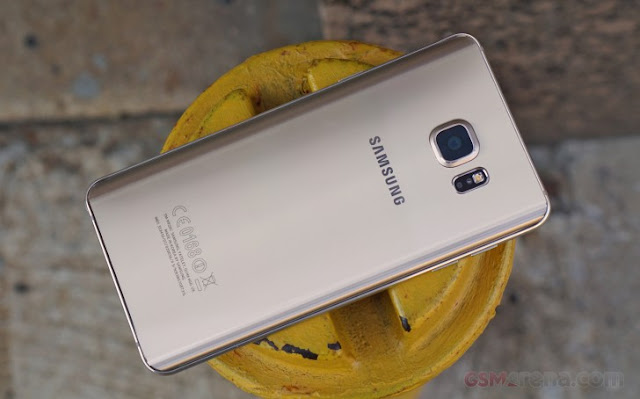
"In the high-end segment, we saw a very strong trend of people using dual-SIMs in our A series smartphones," said Manu Sharma, director-product marketing at Samsung India. "Consumers want a premium device, which has a local SIM and space for another SIM."

The South Korean company expects to extend its dual-SIM strategy to more flagship devices, including the Galaxy S6 edge and Galaxy S6 edge+ in the future. "We will continue doing products that will address an opportunity and we will drive the dual-SIM market in the premium segment, starting with the Note 5," Sharma said.

Specification

NETWORK Technology GSM / HSPA / LTE
2G bands GSM 850 / 900 / 1800 / 1900
3G bands HSDPA 850 / 1900 / 2100 - N920T, N920A, N920I

HSDPA 850 / 900 / 1900 / 2100 - N920G
4G bands LTE band 1(2100), 2(1900), 3(1800), 4(1700/2100), 5(850), 7(2600), 8(900), 17(700), 20(800) - N920A

LTE band 1(2100), 2(1900), 3(1800), 4(1700/2100), 5(850), 7(2600), 8(900), 12(700), 17(700), 19(800), 26(850), 28(700) - N920I

LTE band 1(2100), 2(1900), 3(1800), 4(1700/2100), 5(850), 7(2600), 8(900), 12(700), 17(700), 18(800), 19(800), 26(850), 28(700), 40(2300) - N920G
Speed HSPA 42.2/5.76 Mbps, LTE Cat6 300/50 Mbps/ LTE Cat9 450/50 Mbps
GPRS Yes
EDGE Yes
LAUNCH Announced 2015, August
Status Available. Released 2015, August
BODY Dimensions 153.2 x 76.1 x 7.6 mm (6.03 x 3.00 x 0.30 in)
Weight 171 g (6.03 oz)
SIM Nano-SIM

- S Pen stylus
- Samsung Pay (Visa, MasterCard certified)
DISPLAY Type Super AMOLED capacitive touchscreen, 16M colors
Size 5.7 inches (~75.9% screen-to-body ratio)
Resolution 1440 x 2560 pixels (~518 ppi pixel density)
Multitouch Yes
Protection Corning Gorilla Glass 4


PLATFORM OS Android OS, v5.1.1 (Lollipop)
Chipset Exynos 7420
CPU Quad-core 1.5 GHz Cortex-A53 & Quad-core 2.1 GHz Cortex-A57
GPU Mali-T760MP8
MEMORY Card slot No
Internal 32/64/128 GB, 4 GB RAM
CAMERA Primary 16 MP, f/1.9, 28mm, OIS, autofocus, LED flash, check quality
Features 1/2.6" sensor size, 1.12 µm pixel size, geo-tagging, touch focus, face/smile detection, panorama, HDR
Video 2160p@30fps, 1080p@60fps, dual-video rec., check quality
Secondary 5 MP, f/1.9, 22mm, 1440p@30fps, dual video call, Auto HDR
SOUND Alert types Vibration; MP3, WAV ringtones
Loudspeaker Yes
3.5mm jack Yes


COMMS WLAN Wi-Fi 802.11 a/b/g/n/ac, dual-band, Wi-Fi Direct, hotspot
Bluetooth v4.2, A2DP, EDR, LE
GPS Yes, with A-GPS, GLONASS, BDS
NFC Yes
Radio No
USB microUSB v2.0, USB Host
FEATURES Sensors Fingerprint, accelerometer, gyro, proximity, compass, barometer, heart rate, SpO2
Messaging SMS(threaded view), MMS, Email, Push Mail, IM
Browser HTML5
Java No

- Wireless charging (Qi/PMA) - market dependent
- ANT+ support
- S-Voice natural language commands and dictation
- Active noise cancellation with dedicated mic
- MP4/DivX/XviD/WMV/H.264 player
- MP3/WAV/WMA/eAAC+/FLAC player
- Photo/video editor
- Document editor


BATTERY
Non-removable Li-Po 3000 mAh battery
Stand-by
Talk time Up to 22 h (3G)
Music play Up to 64 h
MISC Colors Black Sapphire, Gold Platinum, Silver Titan, White Pearl
SAR US 1.53 W/kg (head)     1.28 W/kg (body)    
SAR EU 0.45 W/kg (head)     0.58 W/kg (body)    
Price group 42652
TESTS Performance Basemark OS II: 1852 / Basemark X: 26281
Display Contrast ratio: Infinite (nominal), 4.090 (sunlight)
Camera Photo / Video
Loudspeaker Voice 65dB / Noise 64dB / Ring 73dB
Audio quality Noise -93.6dB / Crosstalk -94.7dB
Battery life Endurance rating 85h

Monday, January 11, 2016

How to free up space in iCloud

How to free up space in iCloud

How to free up space in iCloud


Running out of cloud storage and don't want to buy more? Here are a few different ways to free up space in iCloud.


Apple's iCloud storage service can be used to stash away photos, videos, device backups, and more in the cloud. The company offers users 5GB of space for free, however because it's 5GB of space per Apple ID and not per device, you may find yourself running out of space faster than you would like. While additional storage can be purchased from Apple, there are ways to free up space in your iCloud account before shelling out some extra cash.

Check your space

To see how much space you are using, enter Settings on your iPhone or iPad, select iCloud, click Storage, followed by Manage Storage.

Delete old backups

There is a good chance that your backups are taking up most of your space. If you have backups from your old device, say from an iPhone 4 or iPad 2 that you no longer own, you can just go ahead and delete those. Simply click on the backup scroll to the bottom and tap Delete Backup.

Change backup settings


You may also be backing up items that you don't really need to have saved in the cloud. For me, that includes Safari data (I use Google Chrome instead) and Contacts (I save my contacts to Gmail), but it's different for everyone. Head to Setting and click on iCloud. From here you can pick and choose which items you would like to be saved to iCloud. If you find something you really don't care about, flip the switch to off to delete the data. This will also make sure it isn't backed up the next time you perform a backup.

Alternative photo services

An easy way to free up a lot of space in iCloud is to delete photos from your backups. Instead of having photos stored in iCloud, I recommend using one of the many third-party cloud services that offer even more free space than Apple. My personal favorite is Google Photos, which offers unlimited storage for free. There's also Yahoo's Flickr app, Microsoft One Drive, DropBox, and Amazon Cloud Drive. You can learn more about these services in this article.

This article was originally published in October 2014 and has been updated to include new information.

Friday, January 8, 2016

How to hide app icons on iOS 9.2

How to hide app icons on iOS 9.2

How to hide app icons on iOS 9.2


Apple has said it's looking at ways to give users the option of removing preinstalled apps from iOS devices. Although, the company has given no timetable or clear indication if such capabilities will ever manifest in a future version of iOS.

In the meantime, there are ways to get around the limitation. Instead of creating a folder for all of the Apple apps you have zero intention of using, you can take advantage of a bug discovered by Twitter user @VBarraquito.

You can make an app icon disappear by creating a folder, then dragging the icon to the right, creating a blank page within the folder. However, instead of lifting your finger and placing the icon on the new page, press the home button.

If everything has worked properly, you should see the app icon float off of the screen in the top-left corner. The app is still installed, and can be accessed by searching for it in Spotlight.


I tested the workaround on iOS 9.2.1 public beta 2 and was able to hide icons.

As has been the case in the past, the solution is a temporary one -- the app will reappear after you restart your iOS device. In order to hide the apps again, you'll need to go through the process once more. It's not perfect, but for those who don't often restart their device, it's better than nothing.

Below is a video of the trick in action:

Sunday, December 27, 2015

Speedup your Samsung Mobile

Speedup your Samsung Mobile

Speedup your Samsung Mobile


Speedup your Samsung Android Phone in simple way

Just follow this step

Step1:- Type *#9900# on your Samsung Mobile


Step 2: you can see Debug Level Enabled /Low now you select this and it will show 
HIGH- MID- LOW then select MID.

do not select high. !!

Now your mobile restart. then your mobile is speed than before. 


Share with your friends have a joy..!!

Saturday, December 12, 2015

 Samsung Galaxy S7

Samsung Galaxy S7

Unofficial preliminary specifications


Network Technology GSM / HSPA / LTE
2G bands GSM 850 / 900 / 1800 / 1900
3G bands HSDPA 850 / 900 / 1900 / 2100
HSDPA 850 / 900 / 1700 / 1900 / 2100
4G bands LTE
Speed HSPA 42.2/5.76 Mbps, LTE Cat9 450/50 Mbps
GPRS Yes
EDGE Yes
Launch Announced Exp. announcement 2016, February
Status Rumored. Exp. release 2016, Q1
Body Dimensions 143.4 x 70.8 x 6.9 mm (5.65 x 2.79 x 0.27 in)
Weight -
Build Corning Gorilla Glass 5 back panel
SIM Nano-SIM
- Samsung Pay (Visa, MasterCard certified)
Display Type Super AMOLED capacitive touchscreen, 16M colors
Size 5.1 inches (~70.6% screen-to-body ratio)
Resolution 1440 x 2560 pixels (~576 ppi pixel density)
Multitouch Yes
Protection Corning Gorilla Glass 5
- Force Touch display
- TouchWiz UI
Platform OS Android OS, v6.0 (Marshmallow)
Chipset Qualcomm MSM8996 Snapdragon 820/ Exynos 8 Octa 8890
CPU Octa-core
GPU Adreno 530/ Mali-T880 MP12
Memory Card slot No
Internal 32/64/128 GB, 4 GB RAM
Camera Primary Yes, phase detection autofocus, optical image stabilization, dual-LED (dual tone) flash
Features Geo-tagging, touch focus, face detection, Auto HDR, panorama
Video 2160p@30fps, 1080p@60fps, 720p@120fps, HDR, dual-video rec.
Secondary Yes, dual video call, Auto HDR
Sound Alert types Vibration; MP3, WAV ringtones
Loudspeaker Yes
3.5mm jack Yes
Comms WLAN Wi-Fi 802.11 a/b/g/n/ac, dual-band, Wi-Fi Direct, hotspot
Bluetooth v4.2, A2DP, LE, apt-X
GPS Yes, with A-GPS, GLONASS, BDS
NFC Yes
Infrared port Yes
Radio To be confirmed
USB microUSB v2.0, USB Host
Features Sensors Fingerprint, accelerometer, gyro, proximity, compass, barometer, heart rate, SpO2
Messaging SMS(threaded view), MMS, Email, Push Mail, IM
Browser HTML5
Java No
- Fast battery charging: 83% in 30 min (Quick Charge 3.0)
- Wireless charging (Qi/PMA) - market dependent
- ANT+ support
- S-Voice natural language commands and dictation
- OneDrive (115 GB cloud storage)
- Active noise cancellation with dedicated mic
- MP4/DivX/XviD/WMV/H.264 player
- MP3/WAV/WMA/eAAC+/FLAC player
- Photo/video editor
- Document editor
Battery Non-removable battery
Misc Colors Various